Posts

Showing posts from November, 2014

What is serialization in java with example

Last updated: September 2026 — refreshed with modern Java notes and interview Q&A. In this tutorial you will learn about serialization, What is serialization? How to implement serialization in Java? When to use serialization? Why serialization? Things to keep in mind while implementing serialization. OK, so lets start with our first question what is serialization? Well Serialization is a mechanism to convert object's state into sequence of byte stream, so that you can easily send the object byte stream via network or write them in you hard disk. Deserialization is the way of getting the actual object back from the serialized form of an object. To serialized an object your class or any of its super classes must implements either the Serializable interface or it's sub interface called Externalizable. Serialized object has extension called .ser , Serializable is a marker interface means no methods no any fields declared inside the java.io.Serializable interface its...
Hibernate 4 maven one to many mapping example using annotation

Image
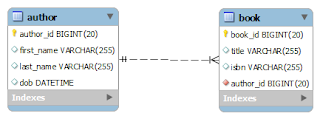
We have already seen the implementation of one-to-one association in hibernate . In this post we are going to implement One-To-Many association mapping example using annotation. For One-To-Many association example using hbm.xml file see our previous article One-To-Many example using hbm.xml   One to many association means each row of a table can be related to many rows in the relating tables. For example, we have an author and book table, we all know that a particular book is written by a particular author. An author of a book is always one and only one person, co-author of a book may be multiple but author always only one. So many books can be written by an author, here many books an author relationship is one-to-many association example. an author has many books that is. 1------------------------* books( one-to-may association) Here is the example of author and book table for our One-To-Many association example. Author table: author_id first_name last_na...

What are the methods of Object class in java?

This question is most respected java interview question and always on demand, before going to advance concept smart interviewer wants to check your fundamental concept regarding java. Interviewer ask you to list down all the method of Object class or list down all the public non final methods of Object class, once you listed he/she will start asking about why they are in object class and when to use them? Well in java Object class is a super class of all the classes available in java including your own classes and resides inside java.lang package. All classes including your own custom classes inherit the instance methods of Object class and those methods are listed below. type javap java.lang.Object on command prompt to list all the methods of Object class. Here we listed all the methods of java.lang.Object class public String toString() public final native Class getClass() public native int hashCode() public boolean equals(java.lang.Object) protected void finalize() thro...

Hibernate one to many mapping using xml

Image
We have already seen the implementation of one-to-one association in hibernate . In this post we are going to implement one-to-many association mapping example using hbm.xml file. One to many association means each row of a table can be related to many rows in the relating tables. For example, we have an author and book table, we all know that a particular book is written by a particular author. An author of a book is always one and only one person, co-author of a book may be multiple but author always only one. So many books can be written by an author, here many books an author relationship is one-to-many association example. author 1------------------------* books Here is the example of author and book table of our one-to-many association example. Author table: author_id first_name last_name dob 101 Joshua Bloch 1961-08-28 102 Watts S. Humphrey 1927-07-04 Book table: book_Id title isbn ...

What is marker interface in java

This types of questions mostly asked for fresher level or 2-3 years of experienced candidates only. Marker interface in java is an empty interface and used to define type of the class. Serializable is a marker interface whenever a class implements a marker interface that class got a special treatment via special methods of java library. For example, If a class implements Serializable interface and going to be serialized then writeObject(obj) method of ObjectOutputStream class does the validation check for the object with the help of instanceof of operator. If object is an instanceof Serializable then write as ordinary object otherwise throw NotSerializableException exception. There is no magic inside the JVM for the Serializable it's all about the writeObject(obj) method who take cares of Serializable object. Here is how serializable interface used inside writeObject(obj) method: if (obj instanceof Serializable) { writeOrdinaryObject(obj, desc, unshared); } In a nu...

Why equals() method in java?

This is again a very common interview question to check the basic concepts of java. Object is super class of all the classes in java and equals() method is exist inside this class. Well, The equals() method as it's name implies this method is used to check the equality of the objects and you know the equality is possible only with more than one objects. So the same way, equals() method of Object class is used to check whether "this object" is equal to "other object ". For example whether the soccer balls was used in FIFA 2014 World Cup are equal to the soccer balls was used in FIFA 2010 World Cup. Definitely answer will be based on the comparison of the specifications used in both the soccer balls example, what are the Circumference, Diameter, Weight, Loss of pressure etc. But if question is something like In which FIFA World cup maximum soccer ball was consumed? 2010 or 2014. Answer will be based on comparison of number of soccer balls was used in both the...

How to override apache tomcat version

Image
Well security is always a major concern not only for your application, but in all the aspect we need security. From to open an account to locking your playing room every where security is required. Your bankers always says that never hints someone about your password of your account. Same way you should never hints someone about your application deployed server details such as which server, what is the version of server etc. Ok, while working with Apache Tomcat , often you will see the tomcat version, if you are trying to access some resources which are not available at your deployed application server. For example see the screen shot. From the screen shot it is very clear that if someone is trying to access a resource from your server which is not exist, he/she will get the tomcat version detail, which is again a security breach. So always hide your server version. How to Override Apache Tomcat Version To override tomcat version you will need to create a file ServerInfo.prop...

Hibernate Maven one to one mapping example using annotation

Image
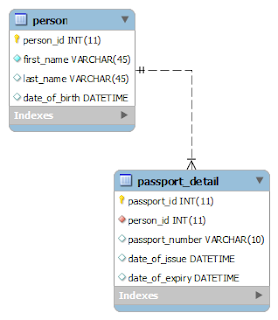
In this post we are going to create a project to implement the step by step one-to-one association example using annotation with maven project. Before that lets have a look what exactly one-to-one association in RDBMS ? One-to-One association means, Each row of table is mapped with exactly one and only one row with another table. For example, we have a passport_detail and person table each row of person table is mapped with exactly one and only one row of passport_detail table. One person has only one passport. For one-to-one association example with hbm.xml file see this one-to-one association using hbm.xml post. Here is an one-to-one association mapping of person and passport_detail table ER diagram: Tools and Technologies we are using here: JDK 7 Maven 3.2.2 Hibernate 4.2.4 MySql 5.5 Eclipse Juno 4.2 Overview of the Project Structure: Main Objects of this project are: pom.xml hibernate.cfg.xml annotated pojo database Step 1. Database Script: CREATE DATA...